For Florida district and charter schools
Train every teacher and administrator on Florida's AI rule, and keep the proof on file.
By July 1, 2027, every district school board and charter governing board must have an AI policy adopted and in place, and that policy must require teacher and administrator training. This self-paced course takes your staff through Rule 6A-1.0957 one duty at a time and leaves them with the parent notices and checklists to carry it out.
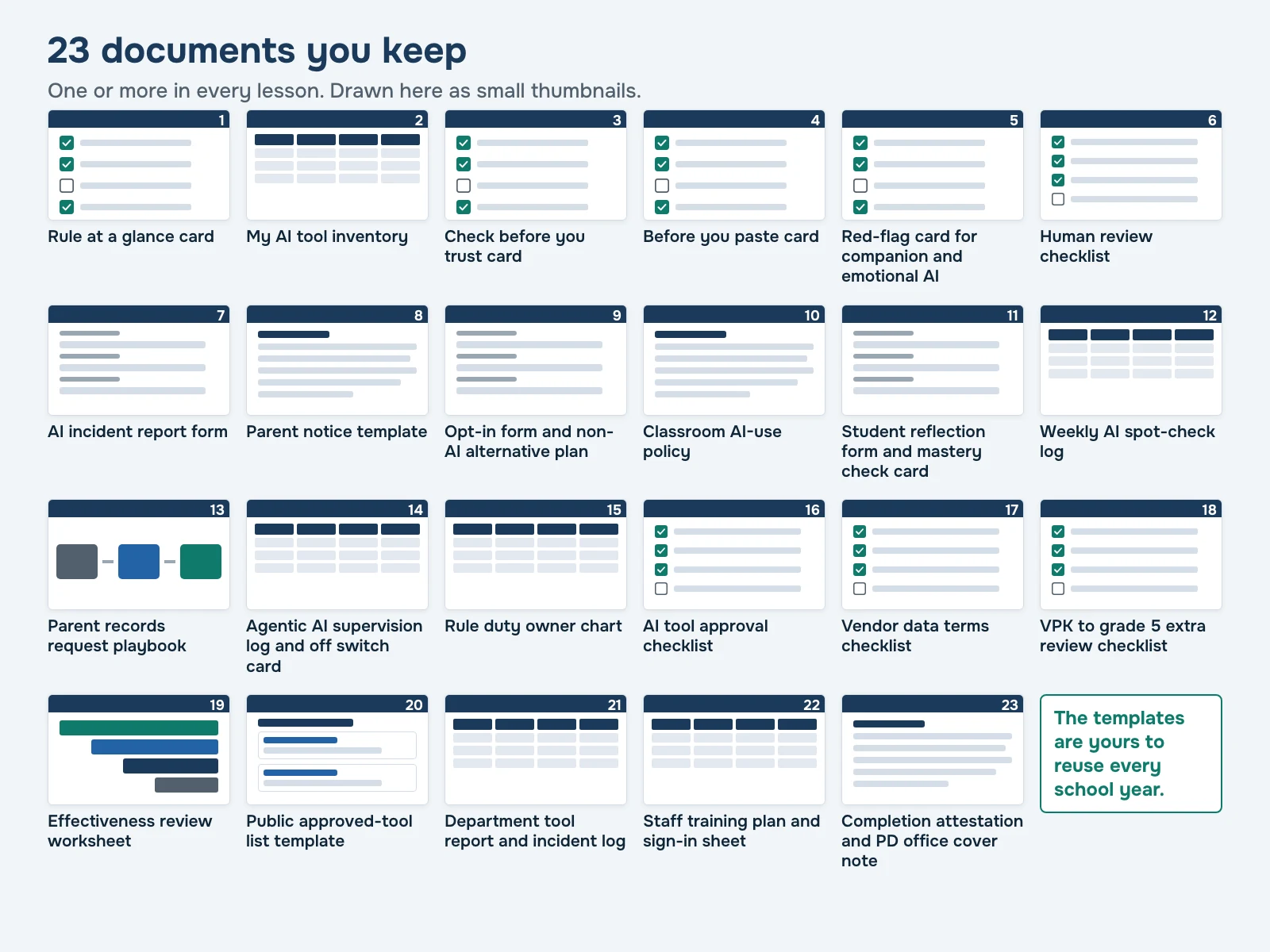
- 23 written lessons
- 23 ready-to-use documents
- 140 to 338 minutes by track
- Certificate with clock hours
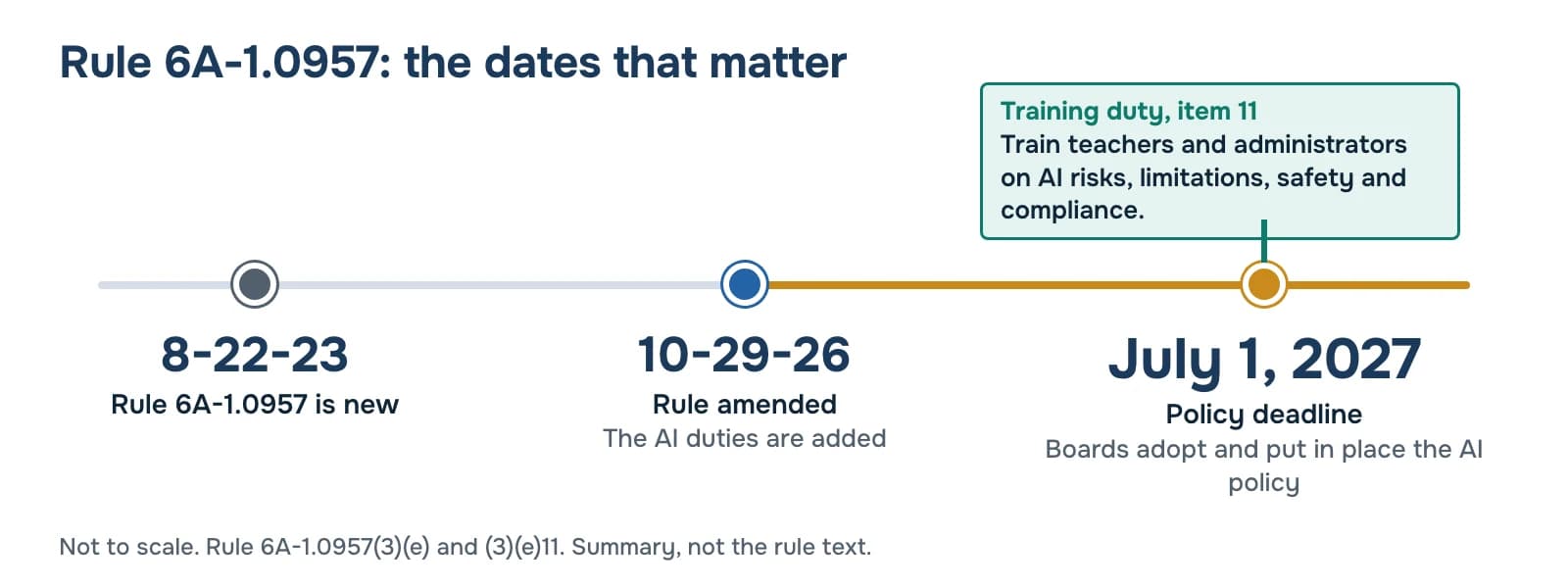
The Florida AI policy deadline for school districts and charter boards
- October 29, 2026Amended Rule 6A-1.0957 effective.
- July 1, 2027Every district school board and charter governing board has its AI policy adopted and in place.
- Item 11That policy must require teacher and administrator training.
Florida's AI rule set a deadline. It left the training to you.
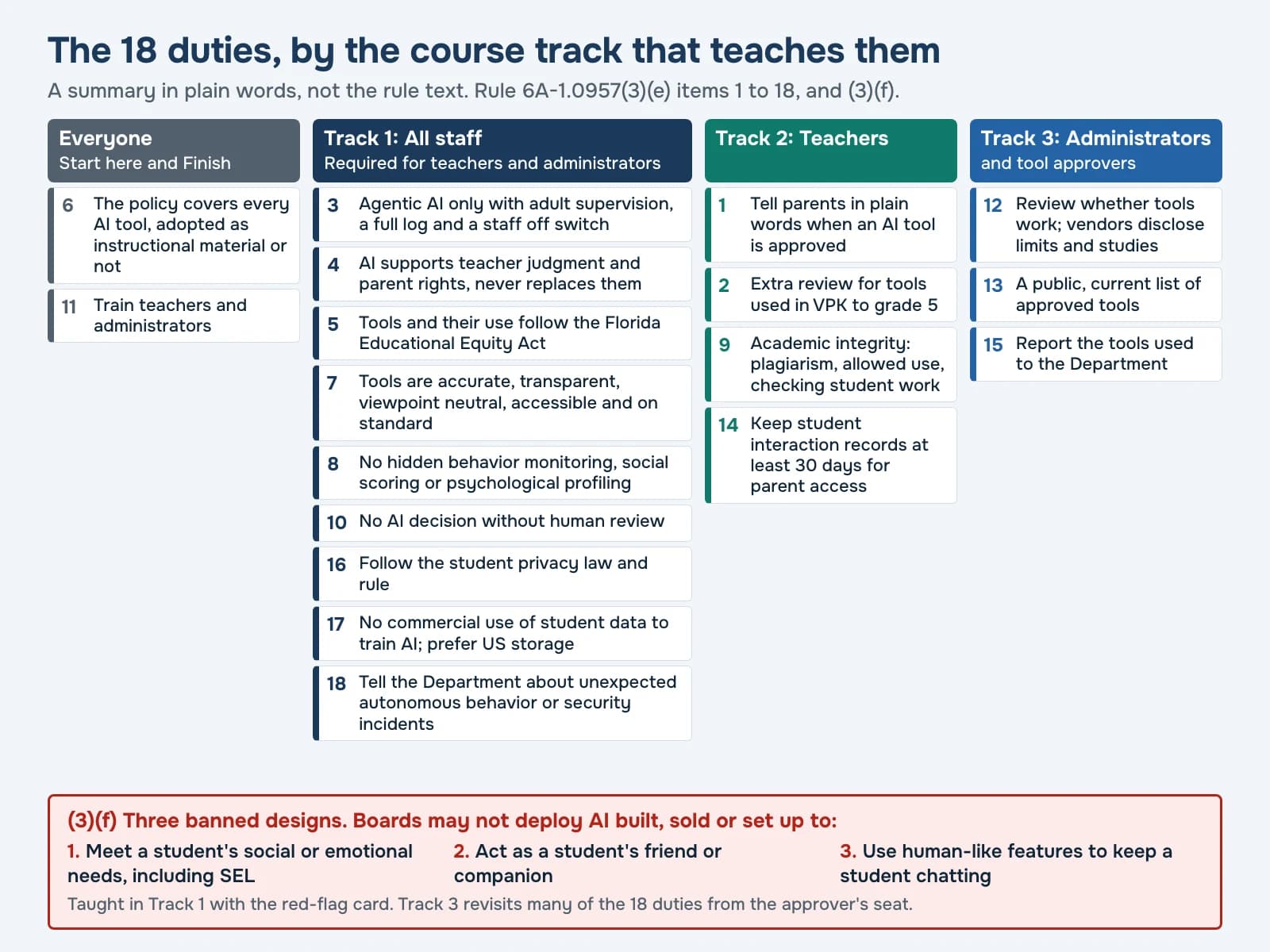
Rule 6A-1.0957 sets the internet safety policy every Florida district and charter board must adopt. The amendment adds Florida's rule on AI instructional tools: paragraph (3)(e) lists 18 things every board's AI policy must do, and item 11 is staff training on AI risks, limitations, safety, and compliance
. The rule names no provider for that training and sets no length.
The duties reach every classroom that uses AI. When a tool is approved, parents get a notice in plain words that covers five specific points. If students use the tool directly, parents can opt their child in, and students who are not opted in get a comparable non-AI alternative. Your teachers need to know this before the first student logs in.
Student data has its own law. Tools must follow s.1006.1494, F.S. and Rule 6A-1.09550, and student data may not be commercially exploited to train AI models. One student record pasted into the wrong tool becomes a hard conversation with a parent.
Your staff have no spare days. Training has to fit into short blocks and leave each person with something they will use the next morning.
Free general AI courses teach what AI is and how to use it. That is useful. Writing a Florida parent notice is a different skill.
And when your board or a parent asks whether staff were trained, you will want more than a calendar invite. You will want a sign-in sheet and a certificate for each person.
What changes for your staff
After their track, here is what your people can do.
- Every teacher has a list of the AI tools they use, with the ones students touch marked.
- Teachers write a parent notice that covers all five points the rule lists: the tool's name, the grades and subjects, what students do with it, how to object to its content, and the opt-in.
- Before they ask parents to opt in, teachers have a fair non-AI alternative planned.
- Staff run five quick checks on AI output before students see it.
- AI can draft a grade or a message home. A person reviews it before it counts.
- When a tool misbehaves, staff stop, save and report, and your office knows what goes to the Department.
- Approvers run every tool through one checklist, including the extra review for VPK to grade 5.
- When someone asks whether staff were trained, you open one folder.
What staff walk away with
23 ready-to-use documents, each one filled in for their own class or school.
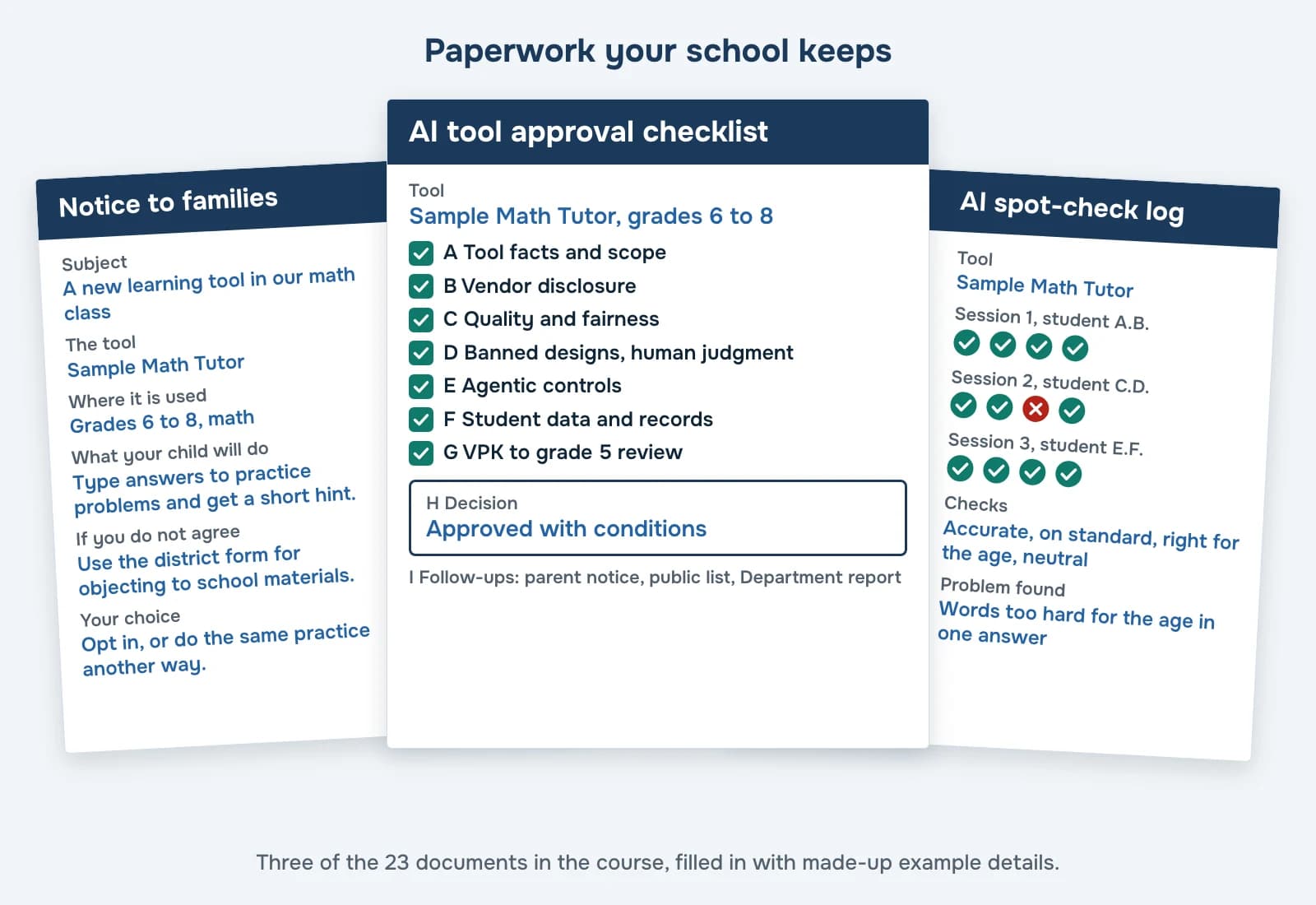
Every lesson ends with a short task, and every task produces a document the person fills in for their own class or school. Each person gets the documents in their own track. The set includes a Florida parent opt-in form with a non-AI alternative plan, and a page template for your public list of approved AI instructional tools.
For parents and families
- Parent notice template covering items 1.a to 1.e in plain languageTeachers
- Opt-in form and comparable non-AI alternative planTeachers
- Parent records request playbook, teacher and office partsTeachers
- Public approved-tool list page templateAdministrators
In the classroom
- Check before you trust card: five checksEveryone
- Human review checklist for grades, discipline, referrals and messages homeEveryone
- Classroom AI-use policy with AI levelsTeachers
- Student AI-use reflection form and mastery check cardTeachers
- Weekly AI interaction spot-check logTeachers
- Agentic AI supervision log and off switch drill cardTeachers
Student data and safety
- Before you paste card for student dataEveryone
- Red-flag card for companion and emotional AIEveryone
- AI incident report formEveryone
- Vendor data terms checklistAdministrators
Choosing and approving tools
- My AI tool inventoryEveryone
- AI tool approval checklistAdministrators
- VPK to grade 5 extra review checklistAdministrators
- Effectiveness review worksheet with ESSA evidence levels in plain wordsAdministrators
Running the rule at your school
- Rule at a glance cardEveryone
- Rule duty owner chart for items 1 to 18 and (3)(f)Administrators
- Department tool report worksheet and incident disclosure logAdministrators
Proof of training
- Staff training plan, sign-in sheet and evidence folder checklistAdministrators
- Completion attestation and PD office cover noteEveryone
The documents are yours to reuse every school year.
Free templates: Florida AI parent notice template and Florida AI rule at a glance card.
How the course works
AI professional development for Florida teachers and administrators, in written lessons of 30 minutes or less, reading and task together.
Give each person a track.
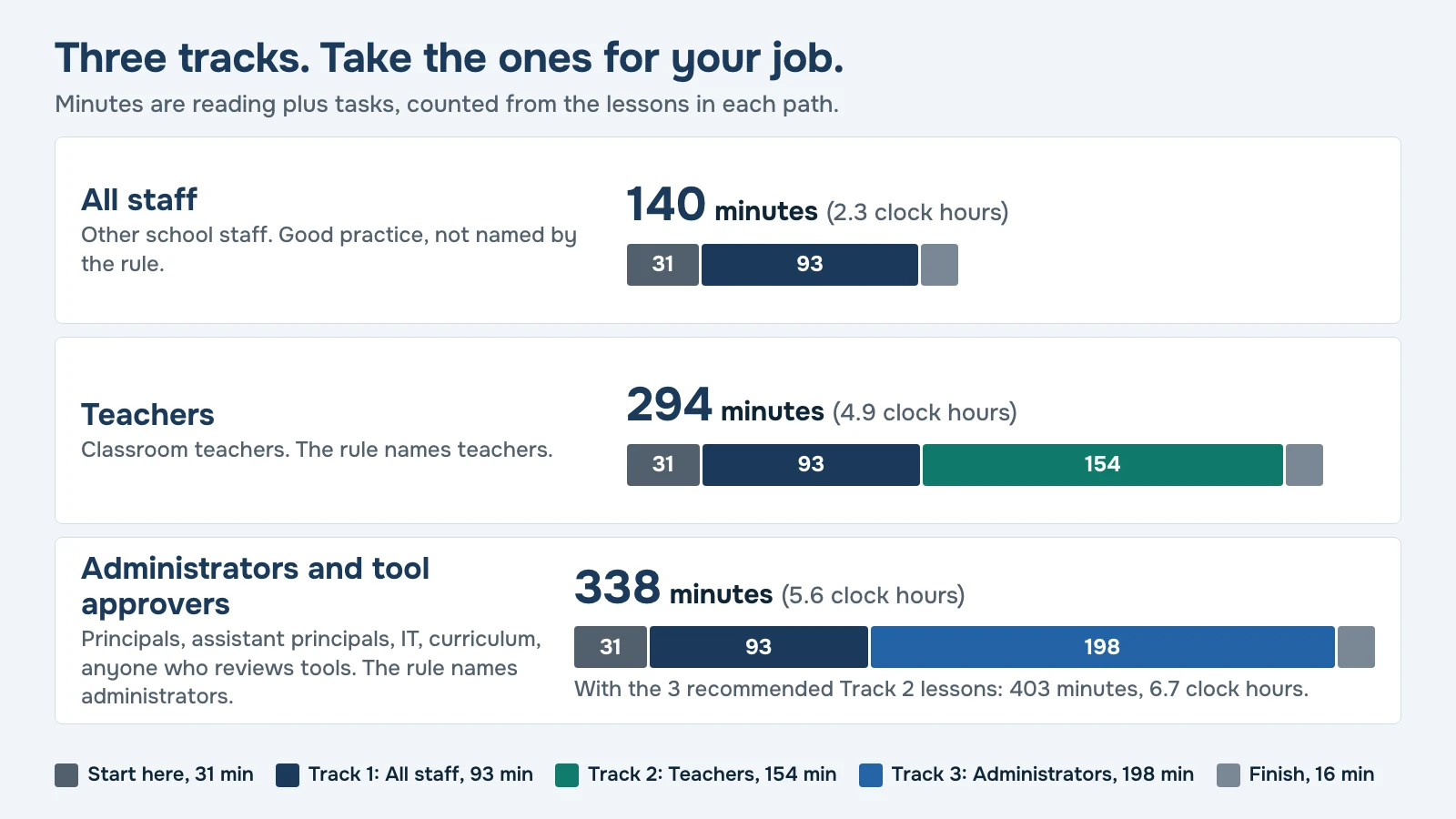
- All staffStart here, Track 1 and Finish.140 minutes, 2.3 clock hours
- Teachersthe same, plus Track 2.294 minutes, 4.9 clock hours
- Administrators and tool approversthe same, plus Track 3.338 minutes, 5.6 clock hours
Read a short lesson.
Each one is a 6 to 12 minute read in plain English, with the rule's own words in quote boxes and a made-up Florida example.
Do the task.
Each lesson ends with a task under 20 minutes. Staff fill in a template for their own class or school, then save a short answer in the lesson.
Sign off.
In the last lesson each person signs an attestation and downloads a certificate. Both go to the principal or PD office.
Staff sign in with a link sent to their email. Their account opens this course and nothing else, and their progress saves as they go.
Inside the course: 23 lessons by track
Each of the 18 duties in paragraph (3)(e), and each of the three banned designs in (3)(f), is taught in at least one lesson. Minutes include the reading and the task.
Start here, everyone (31 minutes)
- The new AI rule: who must act, by when, and why you are here15 min
- How this course works, and your first list of AI tools16 min
Track 1: All staff (93 minutes)
- What AI gets wrong, and five checks before you trust it21 min
- Student data: approved tools only, nothing personal pasted19 min
- Banned designs: AI friends, feelings and hidden profiling18 min
- AI suggests, a person decides18 min
- When a tool misbehaves: stop, save, report17 min
Track 2: Teachers (154 minutes)
- The parent notice: what it must say in plain words24 min
- Opt-in and a fair non-AI alternative24 min
- Your classroom AI rules: what is allowed and what is plagiarism24 min
- Checking student work: drafts, reflection, mastery without AI21 min
- Check what the tool is telling your students23 min
- Student AI chat records and what to do when a parent asks17 min
- AI that acts on its own: supervision, the log and the off switch21 min
Track 3: Administrators and tool approvers (198 minutes)
- Who owns each duty: the rule duty chart for your school26 min
- Approving a tool: the approver's checklist30 min
- Vendor data terms: what to check before anyone signs25 min
- The extra review for VPK to grade 5 tools23 min
- Does the tool work? Reviewing evidence of student outcomes25 min
- The public approved-tool list parents can actually find22 min
- Reporting to the Department: the tool report and incidents24 min
- Running staff training and keeping the proof23 min
Finish, everyone (16 minutes)
- Sign off and hand in your proof16 min
Why a course built on Rule 6A-1.0957, and not a free AI course
Free general AI courses teach AI literacy: what AI is and how to use it. If your staff took one, keep it. This course starts from the other end, with the duties Florida's rule sets and the document each duty needs. It helps staff carry out the rule's duties, and compliance itself depends on your board's adopted policy and how your school runs it.
Check any course you consider against this list.
| Look for | Where it is in this course |
|---|---|
| What a Florida parent notice must say | Lesson 8 and the parent notice template |
| Opt-in and a comparable non-AI alternative | Lesson 9 and the opt-in form |
| The extra review for VPK to grade 5 tools | Lesson 18 and its checklist |
| Student AI interaction records kept at least 30 days for parent access | Lessons 12 and 13 |
| AI that acts on its own: adult supervision, a full log and a staff off switch | Lesson 14 |
| The tool report to the Department and incident disclosure | Lesson 21 |
| The three banned designs in (3)(f) | Lesson 5 and the red-flag card |
| A certificate with clock hours and a component description your professional learning office can review | The Finish lesson |
Built item by item around Rule 6A-1.0957.
A certificate your professional learning office can review
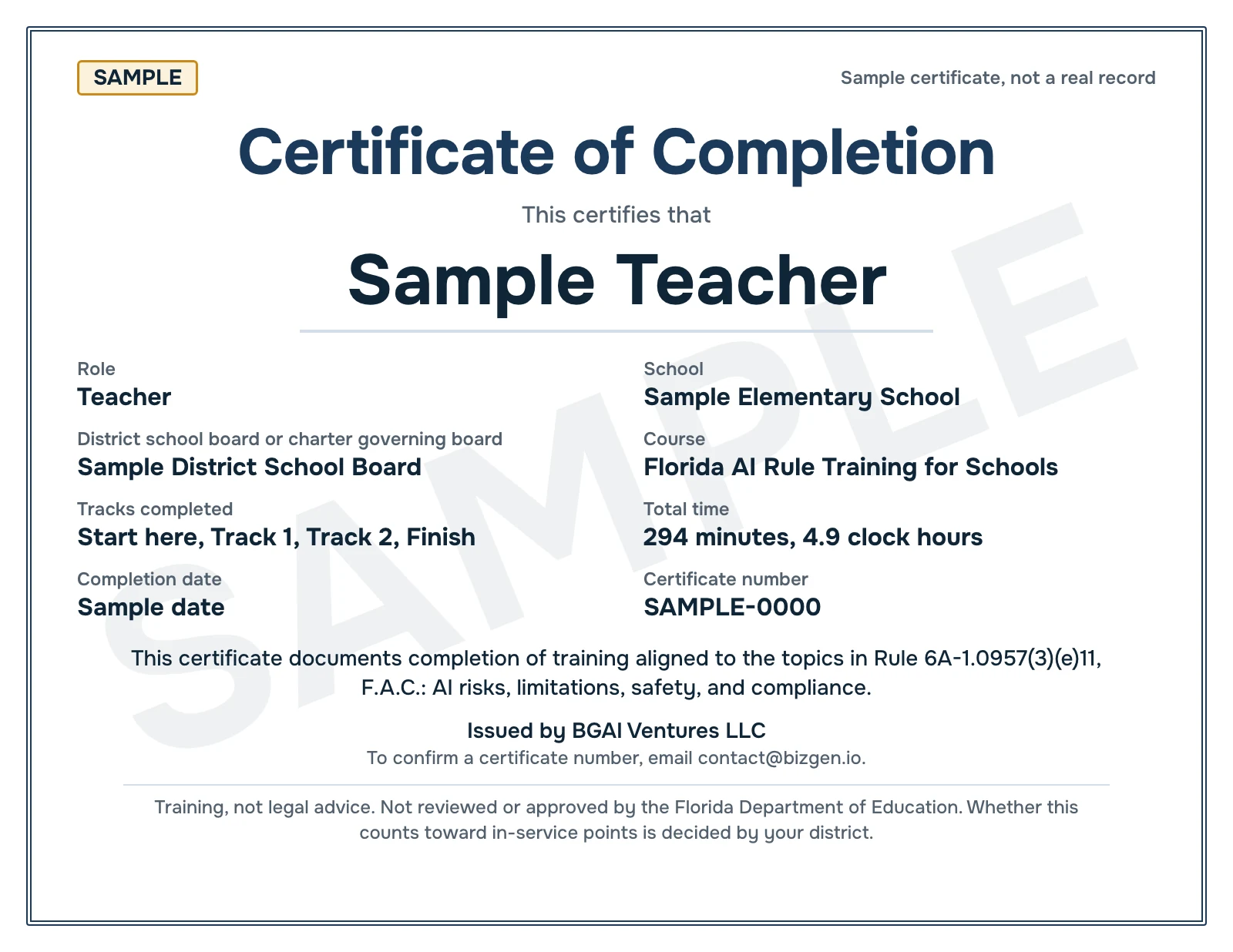
Each person who finishes gets a certificate of completion. It states:
- Name, role, school, and district school board or charter governing board
- Course name and the tracks completed
- Total minutes and clock hours, counted from completed lessons only
- Completion date, and a certificate number your PD office can confirm by emailing contact@bizgen.io
- This line:
This certificate documents completion of training aligned to the topics in Rule 6A-1.0957(3)(e)11, F.A.C.: AI risks, limitations, safety, and compliance.
Page two lists each completed lesson with its minutes, then a component description for your professional learning office. It covers the purpose, one objective per track, the item 11 topics mapped to lessons, how the course is delivered and what shows completion.
What it does not claim. It carries no state seal and no “approved” badge, and it does not promise in-service points. Its small print reads:
Training, not legal advice. Not reviewed or approved by the Florida Department of Education. Whether this counts toward in-service points is decided by your district.
How buying works
Request a pilot quote.
Tell us your school or board and about how many staff.
Get a written quote.
It sets the price and the number of staff seats. It also says how long staff keep access. Prices are by quote.
Start with one school.
A pilot puts the course in front of one school's staff, or one charter board's, so you see how it fits before you go wider.
Pay the way your office pays.
Many schools can buy training like this through a principal's or department's direct purchase. Your purchasing office decides which path applies. We send a W-9 on request.
You buy from BGAI Ventures LLC, a Florida company in Fort Lauderdale.
Who it is for
Teachers.
Track 1 and Track 2: the classroom duties, from the parent notice to checking student work.
Principals and assistant principals.
Track 1 and Track 3: duty owners, tool approval, the public tool list, Department reports and running staff training.
Tool approvers.
Anyone who reviews AI tools, such as IT staff or media specialists, takes Track 1 and Track 3.
District professional learning and instructional technology leads.
One course you assign by role, with a certificate and component description your office can review.
Charter school governing boards and charter management staff.
The rule names charter school governing boards alongside district school boards, and each board adopts its own AI policy. A pilot can start with one charter school.
Other staff.
The rule names teachers and administrators. Anyone else can take the All staff path as good practice.
About us
BGAI Ventures LLC is a Florida company based in Fort Lauderdale. We build practical AI training. We wrote this course from the text of Rule 6A-1.0957, one item at a time, and every rule quote in it was checked word for word against the official text in two independent checks. The course is training, not legal advice. Your board's adopted policy controls.
BGAI Ventures LLC, 2401 NE 65th St, #208, Fort Lauderdale, FL 33308. contact@bizgen.io
Questions before you buy
Is this course approved by the state?
No. It is not reviewed or approved by the Florida Department of Education. The rule requires teacher and administrator training, but it names no provider and sets no length. This course is built on the training topics item 11 names. Your board's policy decides what training it requires.
Does it count toward Florida teacher in-service points?
Your district decides that, so we do not promise points. Each certificate lists clock hours and comes with a component description your professional learning office can review. That office decides whether the course counts.
Is this legal advice?
No. This course is training, not legal advice. Your district's or governing board's adopted policy controls. For a legal question about your policy, ask your board's attorney.
Our district already adopted its AI policy. Is this still useful?
Yes. The policy still has to require staff training, and staff still have to carry it out. The rule sets a minimum, and a board can add more. The first card staff fill in includes your policy link and your AI contact. Where your board's version asks for more than the rule, staff follow your version.
We are a charter school. Does this apply to us?
The rule names charter school governing boards alongside district school boards, and each must adopt its own AI policy by July 1, 2027. The course is written for both, and its examples include charter schools. We do not give legal conclusions about which other laws bind your school. A pilot for one charter school is a simple place to start.
How long does it take?
The All staff path takes 140 minutes, 2.3 clock hours. Teachers take 294 minutes, 4.9 clock hours. Administrators and tool approvers take 338 minutes, 5.6 clock hours. No lesson runs over 30 minutes, reading and task together. Staff can do one lesson at a time and pick up where they stopped.
Which track should each person take?
Teachers take Track 1 and Track 2. School leaders and anyone who approves AI tools take Track 1 and Track 3, and approvers are pointed to three recommended Track 2 lessons (8, 9 and 13). Everyone starts with Start here and ends with Finish. Other staff can take the All staff path as good practice.
Can staff do it on a phone?
For reading, yes. The lessons are web pages that open in a phone's browser, and there is no app to install. For the tasks, a computer or tablet is easier, because each task has staff copy a template into their own document and fill it in. The sign-in email suggests opening the training on a computer or tablet.
What do we get to prove training happened?
The principal gets a staff progress page that lists every person at the school with lessons done, tracks finished and the date they completed, and can download it as a spreadsheet. Each person who finishes has a certificate with their tracks, minutes, clock hours, completion date and certificate number, plus a signed attestation. Staff send both to the principal or PD office, who keeps the training folder. The administrator track gives that office a staff training plan, a sign-in sheet and an evidence folder checklist, and the Finish lesson adds a cover note for your PD office. Any certificate number can be confirmed by emailing contact@bizgen.io.
What does a pilot include?
The full course for the staff of one school or one charter board. Each person gets every lesson and document in their track, and a certificate when they finish. The principal gets the staff progress page. Before it starts, a written quote sets the price and the number of seats, and says how long staff keep access.
What happens to our staff's information?
We keep what the course needs: each person's name, work email, role and school, the lessons they complete and their saved task answers. No task box asks for student information. The site does not send personal information or saved work to an AI company, and does not use it to train AI. We do not sell personal information. Our database is hosted by Neon and the site by Vercel. The full Privacy Policy is at /privacy. To ask about deleting a record, email contact@bizgen.io.
What if the rule changes?
This version is built on the rule as amended effective October 29, 2026. Your board's adopted policy controls, so when it changes, staff check their templates against the new version. Ask about update terms when you request your quote.
Does the course cover parental consent for AI tools?
Yes, using the rule's own term, which is opt in. For a tool students use directly, parents get the option to opt their child in, along with information on a non-AI alternative that is substantively comparable. Lesson 9 covers the opt-in form and how to plan that alternative. What happens when a form comes back blank or not at all follows your district's policy.
Do teachers' own AI planning tools count?
In our reading of the rule's definition, a tool students never interact with is not an AI instructional tool. The rule's human review duty and student data law still apply to it. Lesson 2 has each teacher list every AI tool they use and mark which ones students touch.
Start with one school
Pick one school or one charter board. Tell us how many staff and what you need, and we reply by email with a written quote.
Request a pilot quote
Tell us about your school. We reply by email.
Your request goes to BGAI Ventures LLC by email, and we use it only to reply to you, by email or, if you gave a phone number, by phone. We do not sell your information. Privacy Policy.